
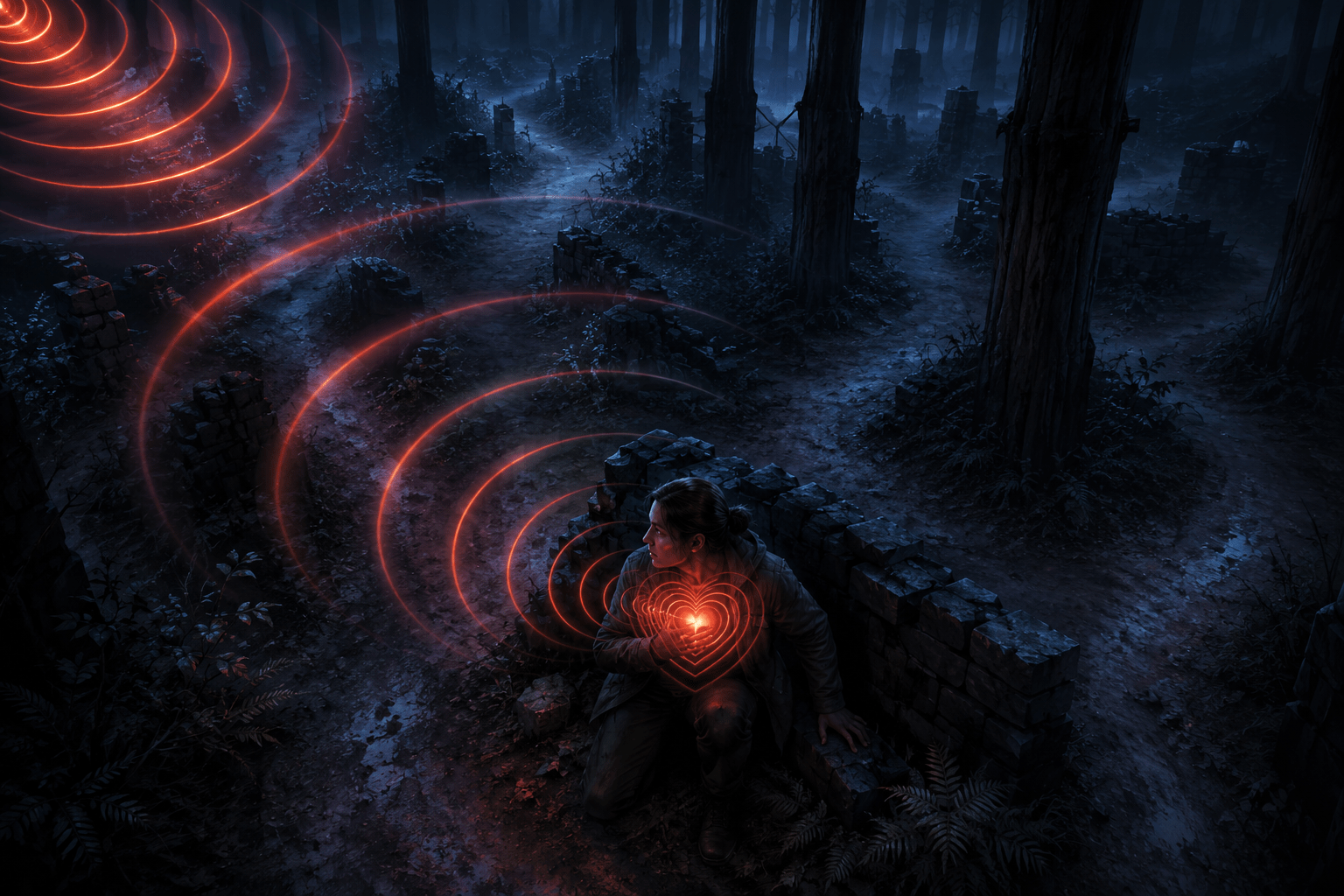
In Dead by Daylight, survivors ordinarily learn that the Killer is nearby by hearing the Terror Radius. Its heartbeat-like sound grows more intense as the distance between the survivor and a non-stealth Killer decreases. This signal is not merely atmospheric. It can determine when a player leaves a generator, searches for cover, changes direction, prepares for a chase, or warns teammates that danger is approaching.
The Visual Terror Radius provides a visual representation of that audible proximity warning. When enabled, a heart-like indicator appears over the survivor’s chest and becomes more intense in response to the Terror Radius that the player is currently able to hear.
This can make one central piece of survivor information available without relying exclusively on hearing. It does not, however, convert the game’s complete soundscape into visual information. It does not caption footsteps, breathing, injured survivors, generators, environmental sounds, Killer powers, or every warning that might influence play.
Its scope is deliberately narrow: it visualizes the Terror Radius and supported lullaby information for survivors.
What the Terror Radius communicates
The Terror Radius is an area around most Killers that produces warning music or a heartbeat-like audio response for survivors. The signal generally becomes more urgent as the Killer gets closer. It communicates proximity rather than a precise location.
A survivor who hears the Terror Radius knows that the Killer is within the audible warning area, but the sound does not necessarily reveal which direction the Killer is facing or which route they are taking. Walls, floors, indoor layouts, elevation changes, and looping paths can make the relationship between proximity and actual danger more complicated.
The radius can also vary. Killers have different base Terror Radius values, and powers, perks, add-ons, or temporary status effects may alter whether it is present and how far it extends. The Undetectable status can suppress the Terror Radius even while a Killer is physically nearby.
Some Killers use a lullaby in addition to or instead of an ordinary proximity experience in particular circumstances. A lullaby is not mechanically identical to a Terror Radius, even though both provide audible information about a Killer’s presence. Behaviour Interactive confirmed during the feature’s introduction that the visual system also represents supported lullabies in the same way the player would hear them.
How the visual heartbeat works
When the Visual Terror Radius is enabled, a heart-shaped pulse is displayed over the survivor character. Its intensity corresponds to the audible warning available to that player. As the audible Terror Radius grows stronger, the visual heartbeat becomes more prominent.
The indicator is attached to the player’s survivor rather than placed as a separate directional compass around the edge of the screen. Other survivors do not see it. The Killer also cannot see that a player has enabled the setting.
The visual response is meant to present information equivalent to the existing proximity sound. It is not intended to provide a separate detection system with greater range. Behaviour Interactive explained that if the player cannot currently hear the Terror Radius, the visual indicator does not independently reveal it.
This means the feature follows effects that suppress the audible warning. If a Killer becomes Undetectable and therefore has no audible Terror Radius for the survivor, the Visual Terror Radius should not expose the Killer simply because they are physically close.
The indicator also does not point toward the Killer. It communicates the strength of the warning, not the direction from which the Killer is approaching. A survivor must still use visual observation, map knowledge, other sounds, teammate behaviour, and environmental information to determine the Killer’s likely position.
A visual alternative, not a complete sound visualizer
Visualizing the Terror Radius can address an important hearing barrier, but it is not equivalent to converting all meaningful game audio into icons or captions.
Dead by Daylight contains many sounds outside the Terror Radius. Survivors may hear footsteps, breathing, vocalizations, movement through vegetation, the activation of a Killer power, a weapon striking an object, another survivor being injured, a generator being repaired, or an environmental interaction.
The Visual Terror Radius does not represent those sounds. Behaviour Interactive specifically described it as limited to the Terror Radius rather than other audio cues such as generators or survivors healing.
This limitation matters because a survivor can receive no visual heartbeat while a stealth Killer remains close enough to be heard through footsteps, breathing, clothing, or power-specific audio. A deaf player may not receive equivalent visual information for those sounds. The absence of a heartbeat therefore does not guarantee that the surrounding area is safe.
Similarly, the indicator cannot communicate every detail contained in Terror Radius music. Some players learn to recognize particular Killers or changes in an encounter through musical characteristics. A visual pulse can convey the presence and approximate intensity of the supported warning without reproducing its full auditory identity.
Why proximity is different from direction
A directional sound indicator identifies where a sound originated relative to the camera or player. It may use arrows, compass markings, or edge-of-screen icons to show that something happened to the left, right, behind, above, or below.
The Visual Terror Radius does not perform that function. A stronger visual heartbeat indicates a more intense audible warning, but it does not reveal whether the Killer is on the opposite side of a wall, approaching from behind, moving on another floor, or travelling away after briefly coming close.
This preserves an important distinction between knowing that danger is nearby and knowing exactly where it is. The player still has to interpret the environment.
That interpretation can be difficult on indoor maps. A Killer on the floor above or below may produce a strong warning despite not having a direct route to the survivor. Conversely, a stealth Killer may approach along a visible corridor without producing a Terror Radius at all.
Players who need directional information may therefore find the feature helpful but incomplete. It replaces one proximity-based sound channel rather than supplying a visual map of nearby threats.
How intensity may support decision-making
A simple warning that only switched on or off would tell a survivor that the Terror Radius was present, but it would remove the changes in urgency communicated by the original audio. The visual heartbeat’s changing intensity preserves more of that relationship.
A faint warning may give a player time to stop an activity, look for escape routes, or determine whether the Killer is occupied elsewhere. A stronger pulse can communicate that the situation is becoming more immediate. The player can use that change over time to decide whether the Killer appears to be approaching or receding.
This may support deaf and hard-of-hearing players, players who cannot distinguish the Terror Radius from competing sounds, or players who use low game volume. It may also reduce the need to maintain headphones at a volume high enough to detect the earliest audible warning.
The visual indicator can reduce auditory monitoring demands, but it adds another item to the screen. The player must notice the pulse while also tracking the environment, generator progress, skill checks, teammates, status effects, and the Killer.
Some players may find an indicator positioned over the character easier to notice than a small interface icon. Others may find a central pulsing effect distracting or visually uncomfortable. The feature can be toggled rather than being forced on every player.
Colour controls and visual clarity
Behaviour Interactive confirmed that the game’s colour-vision settings affect the Visual Terror Radius. This provides some adjustment to the indicator’s appearance within the colour options already available in the game.
Colour adjustment does not guarantee that the pulse will be equally visible in every environment. Dead by Daylight frequently uses dark lighting, fog, red effects, firelight, injury effects, and visually dense surroundings. The indicator’s position over the survivor helps separate it from a fixed background, but contrast may still vary as the camera and environment change.
The feature does not provide a documented option to move the heartbeat to another screen position. During its introduction, Behaviour Interactive stated that its location could not be repositioned around the survivor. Players who need a fixed peripheral indicator or a less central presentation therefore have limited control over its placement.
Because the pulse is animated, it may also carry a sensory cost for some players. A changing visual warning can be easier to notice than a static icon, but repeated pulsing may increase distraction or visual load. Toggling the feature off remains important for players who do not benefit from that presentation.
Survivor access is not Killer access
The Visual Terror Radius is a survivor feature. It does not give Killers equivalent visual representations of survivor sounds.
Killers often use audio to locate breathing, injured vocalizations, footsteps, rushed movements, disturbed environmental objects, and work being performed on nearby generators. A deaf or hard-of-hearing player controlling the Killer may therefore encounter significant audio-dependent barriers that the Visual Terror Radius does not address.
Behaviour Interactive acknowledged this limitation when the feature was announced. The developer explained that there was no equivalent system for the Killer role at that time and chose to release the survivor accessibility option without waiting for a matching feature.
This is an important practical boundary. The presence of a visual alternative for one major survivor cue does not mean that Dead by Daylight provides comprehensive deaf and hard-of-hearing access across both roles.
Interactions with stealth and changing Terror Radiuses
The visual system follows the Terror Radius the survivor is able to hear rather than revealing the Killer’s physical distance directly. This prevents it from acting as a universal proximity detector.
When a Killer gains the Undetectable status and their Terror Radius is suppressed, the visual warning is also suppressed. Killers designed around stealth can therefore still approach without producing the ordinary heartbeat signal.
Effects that expand or reduce the Terror Radius can change when the warning begins. A larger Terror Radius may cause both the audible and visual warnings to appear farther away. A smaller radius can delay them until the Killer is closer.
Because the indicator represents the warning rather than measuring physical distance, two Killers at the same location may not produce identical visual information. Their powers, current status, base radius, or active modifiers may differ.
Lullabies create another distinction. They can extend beyond an ordinary Terror Radius and may not be suppressed by all of the same effects. The visual representation may show supported lullaby intensity, but it does not turn the lullaby into a directional locator or make its underlying mechanics identical to a Terror Radius.
What the setting does not automate
The Visual Terror Radius provides information. It does not select a safe route, interrupt an interaction, move the survivor into cover, warn teammates, or begin a chase response automatically.
The player must still notice the indicator, interpret its intensity, decide what it means within the current map and match, and carry out a response. A stronger pulse might justify leaving a generator, but it could also represent a Killer pursuing someone on another floor or passing behind an obstacle.
This preserves survivor decision-making while making the underlying proximity cue available through an additional sensory channel. It is assistance through information equivalence, not automation.
Platform availability and online limitations
Dead by Daylight is available across PC, PlayStation, Xbox, and Nintendo Switch platforms. The Visual Terror Radius is a built-in game setting rather than a third-party mod, so it does not require altering game files or installing external software.
The game is continually updated, and Killer mechanics, Terror Radius values, status interactions, and temporary modes may change. Some limited-time modes can deliberately remove the ordinary Terror Radius as part of their rules. When the underlying warning is absent, the visual alternative cannot display information that the mode has removed.
As an online asymmetrical game, Dead by Daylight also depends on network conditions and fast-changing encounters. The visual cue can make the Terror Radius perceptible without sound, but it does not eliminate latency, rapid camera movement, visual obstruction, or the timing demands of escaping another player.
One essential sound represented visually
The Visual Terror Radius converts a central survivor warning from an audio-only signal into synchronized visual information. Its changing intensity can help communicate that a non-stealth Killer is within the audible warning area and whether that warning is becoming more urgent.
Behaviour Interactive’s explanation of the feature and its limits can be found in the official Dead by Daylight community discussion, where developer representatives confirmed that it is an optional accessibility feature for survivors.
Access needs vary. The Visual Terror Radius may reduce reliance on hearing for one important proximity cue, but it does not display direction, reveal stealth Killers, visualize the complete soundscape, or provide equivalent audio visualization for the Killer role.