
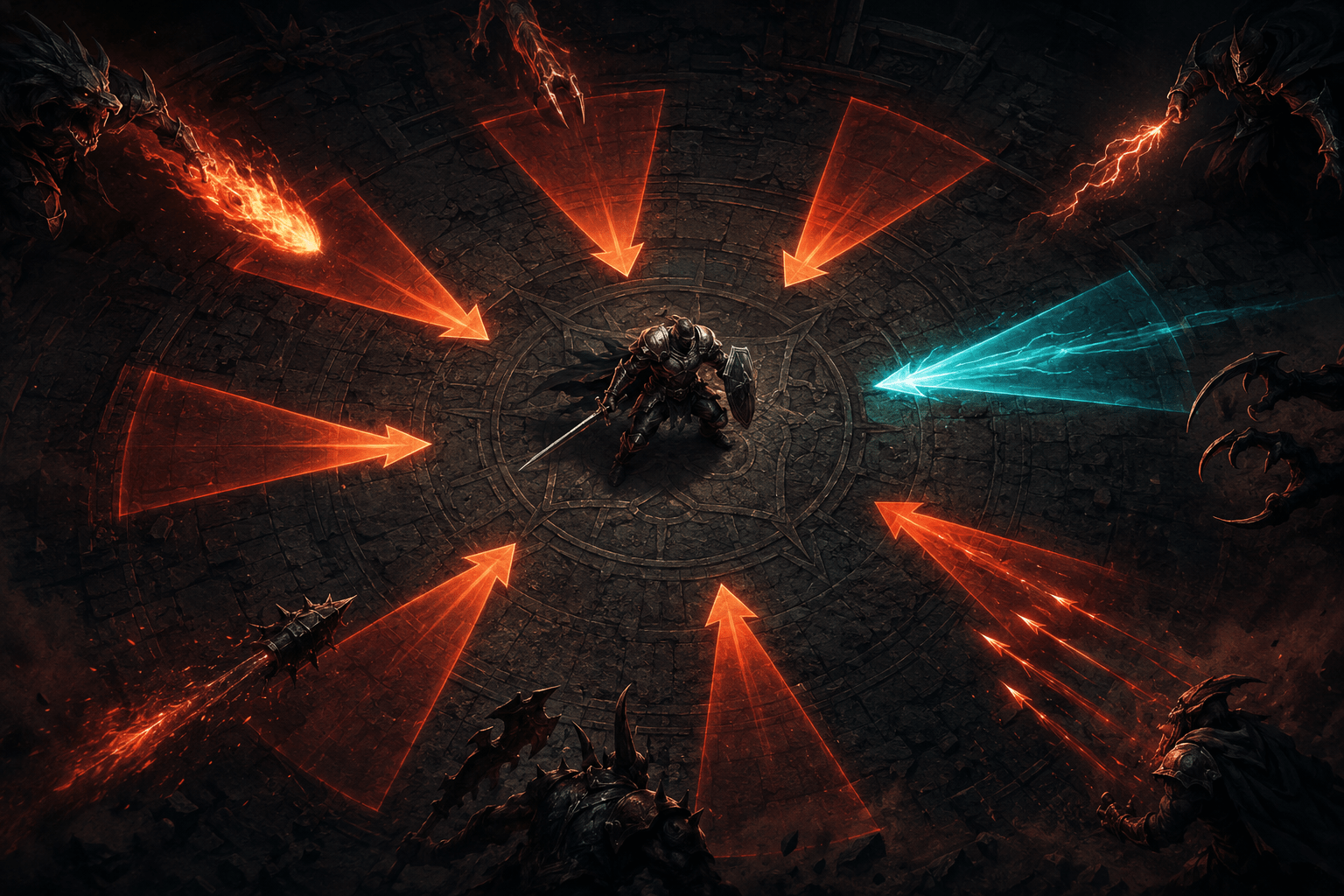
Combat in DOOM: The Dark Ages can surround the player with enemies, projectiles, and attacks arriving from outside the current camera view. Ordinarily, the game may communicate these threats through enemy sounds, weapon effects, spatial audio, movement at the edge of the screen, or the player’s knowledge of where enemies were last seen.
The Threat Detector adds another information channel. When enabled, it displays directional interface indicators for incoming enemy attacks, including threats originating off-screen. Instead of requiring the player to hear or visually locate every attacker before responding, the feature shows where selected attacks are coming from.
The setting can display all supported enemy threats or restrict its indicators to attacks that can be parried. This choice allows it to function either as a broader source of combat awareness or as a more selective parry aid.
Threat Detector does not prevent attacks, activate a parry, move the character, or describe the exact enemy producing the threat. It converts some incoming-attack information into visible directional cues while leaving the response to the player.
What the Directional Indicators Communicate
The Threat Detector places indicators on the screen to show the direction of incoming attacks. If an enemy attacks from outside the camera’s current field of view, the relevant indicator can alert the player and point toward the source direction.
This changes an off-screen threat from something that may be communicated primarily through sound into something that can also be interpreted visually. A player does not necessarily have to turn the camera toward every enemy before receiving warning that an attack is approaching.
The indicator communicates direction rather than providing a complete description. It can show that a threat is arriving from the left, right, rear, or another relative direction, but Bethesda’s documentation does not describe it as identifying the attacking enemy by name, explaining the attack type, or displaying the exact path the projectile will follow.
The presence of an indicator also does not mean the game has paused. DOOM: The Dark Ages remains a real-time action game. Players must notice the visual cue, understand its direction, decide how to respond, and perform the relevant input while combat continues.
This distinction matters because displaying a hazard is not the same as resolving it. Threat Detector supplies information that may otherwise be missed, but it does not replace the timing, aiming, movement, and decision-making involved in avoiding or countering the attack.
All Threats Versus Parryable Attacks
Threat Detector has two enabled states. Setting it to On displays directional indicators for all supported types of incoming enemy threats. The alternative, Only Show Parryable Attacks, restricts the indicators to incoming attacks that the player can parry.
The broader mode may provide more comprehensive awareness during encounters involving enemies on several sides. It can make a larger portion of the surrounding combat state visible, including threats the player might not hear or notice at the edge of the screen.
That additional information can also increase interface activity. When several enemies attack at once, multiple indicators may appear around the player. Someone who becomes overwhelmed by numerous simultaneous visual signals may find the selective mode easier to process.
Only Show Parryable Attacks gives the indicators a narrower purpose. Instead of representing every supported incoming threat, they identify attacks connected to a specific possible response. This may reduce visual density and help the player concentrate on parry opportunities.
The selective mode is not equivalent to making every incoming attack parryable. It filters what the detector displays; it does not change enemy attacks or expand the game’s parry rules. Threats that cannot be parried may still cause damage even though the detector has been configured not to show them.
Choosing between the modes therefore involves a trade-off between the amount of information shown and the number of indicators competing for attention. One player may need warnings for as many off-screen attacks as possible. Another may want the interface to highlight only the attacks tied to a particular defensive action.
Making Auditory Combat Information Visual
Enemy attacks are often designed to produce recognizable sounds. A vocalization, weapon discharge, projectile noise, or other effect may warn that an attack has begun even when its source is outside the camera view. Spatial audio can also indicate where that sound originated.
These cues may be inaccessible or unreliable for a player who is deaf, hard of hearing, unable to localize sound consistently, playing without stereo audio, or using an environment where important effects are masked by other sounds. Reducing the sound-effects volume for sensory comfort can also make auditory warnings less prominent.
Threat Detector creates visual redundancy for critical off-screen attack sounds. Bethesda specifically describes the game as visualizing combat-related sound effects through its threat indicators. The feature may therefore reduce dependence on hearing the direction of an attack before reacting to it.
It is not a general-purpose sound visualizer. The documentation describes incoming enemy attacks and critical off-screen attack effects, not footsteps, environmental ambience, dialogue, collectibles, machinery, or every sound in the game. Players should not expect it to caption the complete soundscape.
Threat Detector is also different from subtitles and captions. Subtitles reproduce spoken dialogue as text. Captions may add written descriptions of relevant non-dialogue sounds. Threat Detector instead uses a directional visual symbol connected to a combat event. It prioritizes where an attack is coming from rather than presenting a written description of what was heard.
How It May Support Visual Attention
An off-screen warning can be valuable even for players who hear the original sound. Fast combat may require attention to the reticle, current target, nearby projectiles, health and armour, parry opportunities, and the surrounding terrain. Tracking the position of every enemy at the same time may be difficult.
The indicator ring can place directional information closer to the active area of the screen. This may reduce the need to search the entire frame for a partially visible attacker or repeatedly rotate the camera simply to check whether an enemy is behind the player.
Players with a restricted visual field, difficulty shifting attention across a large display, or difficulty separating enemies from a detailed background may find this useful. The cue reduces a complex attacker to a simpler directional signal.
However, the indicator itself must still be seen and interpreted. Threat Detector does not convert the information into vibration or spoken output. A player who cannot perceive the indicators may not receive an equivalent benefit from enabling the setting.
The game’s lack of menu screen-reader support and audio-based navigation assistance also remains relevant. Bethesda states that players without sight may require sighted assistance with menus and gameplay. Threat Detector improves visual access to certain combat information; it is not a substitute for comprehensive blind-accessibility support.
Threat Detection Versus High Contrast Mode
DOOM: The Dark Ages also includes a group of settings that form its high contrast mode. The World Desaturation slider reduces colour in the environment, while separate highlight categories can visually distinguish enemies, hazards, interactable objects, pickups, attacks, shield-breakable objects, enemy leaders, and parryable attacks.
High contrast highlighting and Threat Detector solve different problems. High contrast settings can make visible enemies and objects easier to distinguish from the world. Threat Detector communicates the direction of incoming attacks, including attacks from enemies outside the current view.
An enemy highlight cannot make an off-screen attacker visible because that enemy is not being rendered within the camera frame. The Threat Detector can still indicate the direction of the attack. Conversely, a directional indicator does not outline the enemy once the camera turns toward it. Combining the two systems may provide both directional warning and improved target separation.
World Desaturation can be adjusted between 10% and 100%, and the colour and strength of individual highlight categories can be customized. These controls may help players establish a more readable contrast relationship between the arena, enemies, hazards, and attacks.
Bethesda recommends disabling the separate Parry Recolor setting when using World Desaturation because the colour systems can conflict. Players combining Threat Detector, high contrast highlights, and parry-related colour options may need to test the resulting presentation rather than assuming that enabling every visual aid simultaneously will produce the clearest display.
Threat Detector Versus Parry Recolor
Parry Recolor allows players to customize the colour used for attacks that can be parried. It uses red, green, blue, and alpha controls, allowing both the colour and its visual strength to be adjusted.
This setting changes how a parryable attack is presented when it is visible. Threat Detector adds directional interface information about incoming threats. A distinct detector indicator can differentiate a parryable threat from other incoming attacks, but the detector is not the same as recolouring the attack itself.
Using the two together may make the sequence easier to follow: the directional cue can alert the player to an off-screen parry opportunity, while the recoloured attack can help identify it after the camera or enemy moves into view.
The player must still perform the parry. Neither setting widens the parry timing window. That timing demand is controlled separately through the game’s Parry Window difficulty setting, which can make the opportunity more forgiving or more precise.
This separation allows players to address different barriers independently. Threat Detector changes awareness, Parry Recolor changes visual identification, and Parry Window changes timing. Someone may need one, two, or all three settings.
Combining Threat Detection With Timing Adjustments
A visible warning is only useful if the player has enough time to respond. DOOM: The Dark Ages includes several combat modifiers that may be combined with Threat Detector when the default pace remains inaccessible.
The Parry Window setting adjusts how long the player has to parry. A larger value creates a more forgiving response window. Enemy Projectile Speed can slow most incoming projectiles, while the overall Game Speed slider can reduce gameplay speed to as low as 50%.
These settings change different stages of the interaction. Threat Detector helps the player notice where an incoming attack originates. Slower projectile speed can provide more time to track its movement. A larger parry window can reduce the timing precision required for the defensive response. Reduced game speed affects the broader pace of player and enemy movement.
Combining them may be more useful than treating one visual indicator as a complete solution. A player may perceive the threat direction successfully but still be unable to react within the default interval. Another player may need only the directional warning and prefer to leave combat timing unchanged.
The game also includes an Enemy Aggression modifier that changes how many enemies attack at once and how often they attack. Reducing aggression may lower the number of simultaneous threat indicators and decrease the cognitive load involved in deciding which warning requires the most immediate response.
Visual Clutter and Sensory Trade-Offs
Threat Detector adds visual elements to an already visually active game. During large encounters, the screen may contain enemies, projectiles, weapon effects, environmental movement, high contrast outlines, interface information, and several directional indicators at once.
For some players, the detector can organize that activity by converting off-screen hazards into consistent symbols. For others, the added indicators may contribute to visual crowding or make it harder to prioritize information.
The Only Show Parryable Attacks mode provides one way to limit this cost. Other settings can reduce unrelated visual effects. Environmental Screen Shake can be disabled or adjusted, edge-of-screen effects can be hidden, and motion blur, chromatic aberration, film grain, and weapon bob can be reduced or disabled separately.
These controls do not guarantee a low-stimulation presentation. Weapon recoil can remain even when Weapon Bob is disabled, and cinematics are not affected by the high contrast mode. Threat Detector itself does not remove flashes, projectiles, enemy effects, or rapid movement.
Supported Platforms and Scope
DOOM: The Dark Ages is available on Xbox Series X|S, PlayStation 5, and Windows PC through the Microsoft Store, Steam, and Battle.net. Bethesda also lists cloud and supported PC-handheld options, although performance and input arrangements vary by service and device.
The Threat Detector is documented as part of the game’s built-in HUD options rather than a platform-level feature or third-party modification. Players can find it within the interface settings, and selected accessibility options are also duplicated in the dedicated Accessibility Menu for easier discovery.
The setting applies to supported incoming enemy attacks. Bethesda does not claim that it visualizes every damaging event, environmental danger, or combat sound. Its indicators should therefore be understood as an additional warning system rather than an exhaustive representation of everything capable of harming the player.
Directional Warning, Not Automatic Defence
Bethesda’s official DOOM: The Dark Ages Accessibility Guide describes the Threat Detector alongside the game’s high contrast, parry, timing, motion, subtitle, control, and difficulty options.
Threat Detector can make supported incoming attacks visible and communicate the direction of threats originating outside the camera view. Its broader mode shows all supported enemy threats, while its selective mode limits the display to parryable attacks. This may reduce reliance on spatial hearing, constant camera checking, or detecting enemies against visually complex environments.
It does not identify every sound, eliminate visual clutter, widen the parry window, or defend the character automatically. Access needs vary, and some players may need to combine it with high contrast highlighting, slower projectiles, reduced game speed, lower aggression, or other settings. Its practical value lies in making a specific layer of off-screen combat information visible while leaving the interpretation and response to the player.