
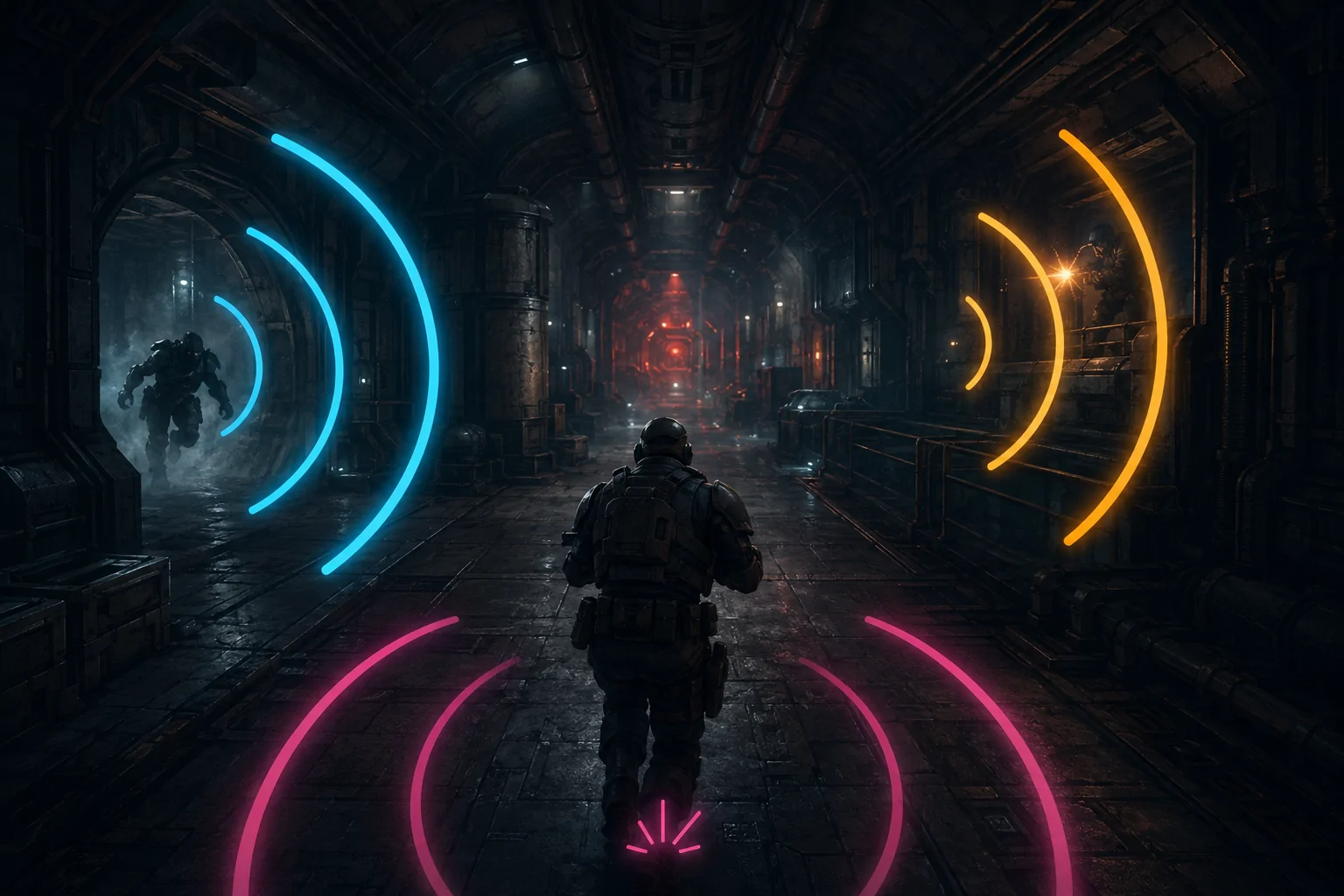
Warhammer 40,000: Darktide uses sound as an important source of combat information. Special and elite enemies produce characteristic audio cues as they approach or prepare particular attacks. The game also uses sound to warn about threats outside the player’s current view, including an enemy attempting to strike from behind.
These cues can give a hearing player time to turn, dodge, block, reposition, or warn the rest of the team. When equivalent information is not communicated visually, deaf and hard-of-hearing players may receive less warning of the same event. Subtitles do not necessarily resolve this problem because ordinary dialogue transcription is different from communicating the direction, proximity, and timing of a combat sound.
Spidey Sense is a community-created accessibility mod that converts selected enemy audio cues into visual warning arcs and text alerts. The arcs indicate the direction associated with a cue, while optional proximity behaviour can communicate that a particular enemy is getting closer.
The mod does not add captions for every sound in the game. It focuses on a defined group of combat-critical events, especially special and elite enemies whose audio cues affect immediate player decisions. It is a third-party PC modification rather than a built-in accessibility setting.
How the Directional Warning Arcs Work
Spidey Sense adds curved visual indicators around the player’s central field of view. Their position indicates the direction from which a supported audio cue originated. A warning on the left side corresponds to a threat or event on the player’s left, while a warning on the right communicates an event on that side.
The mod’s description compares these indicators to damage-direction arcs. The concept is similar, but the arcs can appear in response to an enemy’s warning sound before damage occurs. They provide information about a developing threat rather than only confirming that the character has already been hit.
By default, supported indicators appear only when the relevant target is within 40 metres. The player can configure the range separately for individual event types. This prevents every detected cue from appearing regardless of distance and allows the player to decide how early a particular warning should become visible.
Spidey Sense can also use a Dynamic Active Range option. With this enabled, an arc moves closer to the centre of the display as the source approaches. The changing position provides a visual representation of proximity rather than displaying every threat at a fixed radius.
This does not amount to a conventional distance meter. Unless a separate count or warning has been enabled, the arc is primarily a directional and relative-proximity cue. It does not provide a complete three-dimensional coordinate, map location, unobstructed route, or exact travel distance to the enemy.
Which Enemies and Events Can Produce Warnings
The mod’s documented coverage includes barrels and a range of special, elite, and boss enemies. These include Bursters, Crushers, Daemonhosts, Flamers, Grenadiers, Hounds, Maulers, Mutants, Plasma Gunners, Ragers, Snipers, Trappers, Tox Bombers, and large enemies such as the Plague Ogryn, Chaos Spawn, and Beast of Nurgle.
Coverage has changed as the mod has been updated. New enemy types and variations have been added over time, while game updates have required fixes to existing alerts. Players should therefore consult the current mod page rather than relying on an older copied list.
Spidey Sense also includes a visual backstab warning. This provides a redundant visual channel for an off-screen attack cue, addressing a situation in which the player cannot see the attacker and may not hear the original warning.
The mod distinguishes between some melee and ranged backstab events. It also provides specialized text warnings for particular attacks, including Trapper nets, Crusher overhead attacks, Plague Ogryn charges, Shotgunners preparing their weapons, Hounds about to pounce, and supported Sniper events.
These alerts are selective. The mod does not claim to visualize every footstep, weapon discharge, ambient sound, enemy vocalization, teammate callout, or combat event. Unsupported enemies or events may still rely on their original presentation.
Directional Visualization Is Not the Same as Subtitling
Subtitles usually convert spoken dialogue into text. They can communicate what a character said and may identify the speaker, but they do not automatically represent non-speech effects such as a creature preparing to pounce or an unseen enemy beginning an attack.
Sound captions can cover non-dialogue events, but a caption such as “enemy approaching” may still omit the direction and changing proximity contained in the original sound. A directional arc can communicate left-versus-right positioning more immediately than a sentence that must be read and interpreted.
Spidey Sense therefore functions as visualized audio rather than a general subtitle replacement. Its arcs preserve selected spatial aspects of sound, while its text alerts communicate particular high-priority actions.
The reverse limitation also applies. A coloured arc may communicate where an event occurred without explaining what the original sound was like. If several warnings share similar visual forms, the player may need to learn their configured colours or combine the arcs with the mod’s text indicators.
Neither visual arcs nor subtitles universally replace sound. Different auditory information requires different visual equivalents: speech may need transcription, an environmental alarm may need a labelled cue, and an off-screen attack may need direction and timing.
Customizing Individual Enemy Warnings
Spidey Sense allows each supported indicator to be toggled independently. A player can disable an event they do not need rather than accepting every available arc.
Colours can be changed for individual enemy or event types. Distinct colours may make it easier to separate a Trapper warning from a Mutant or Hound warning. The mod also allows settings to be copied from one target type to another, reducing the work required when several alerts should use the same presentation.
Colour customization does not guarantee colour accessibility. Players who cannot reliably distinguish selected colours may need to choose combinations with sufficient luminance and contrast rather than relying on hue alone. Environmental lighting and other interface elements can also affect how visible an arc remains.
The radius or distance of the indicator from the centre can be adjusted. Arcs can also be configured to appear only when the corresponding threat is behind the player. This may reduce visual clutter for enemies that are already visible in front of the character.
A separate proximity alert can be assigned to a particular enemy type. When that enemy enters the configured range, the mod adds an alert icon indicating that the threat is especially close. The general directional arc and the close-range alert therefore communicate related but different information.
Supporting Unilateral Hearing Loss
One of the mod’s more unusual options allows warning arcs to be restricted to the left or right side rather than using both sides. The mod author introduced this to reduce unnecessary indicators for people whose hearing loss affects only one side.
A player who hears cues reliably on the right but not the left may choose to display only left-side arcs. This provides visual redundancy where it is needed without duplicating all directional audio across the entire display.
This is different from converting stereo audio to mono. Mono audio can ensure that sounds assigned to one audio channel are not entirely absent from the other ear, but it reduces or removes the left-right separation used for directional listening. A side-specific visual indicator supplements selected directions without necessarily changing the audio mix.
The setting does not evaluate an individual’s hearing or automatically determine which cues they can perceive. The player must choose the appropriate side and decide whether restricting the display removes warnings they still need.
Warnings for Multiple Enemies
Combat can include more than one enemy of the same type. A single arc might otherwise imply one threat when several are present. Spidey Sense can display an instance count when more than one supported enemy of a particular type is in range.
This count is optional and must be enabled for the relevant type. It adds numerical information to the arc rather than drawing an independent directional indicator for every individual enemy.
A count therefore communicates quantity without necessarily providing a separate precise direction for every member of the group. Multiple enemies positioned on different elevations or around separate obstacles may still be represented in a simplified way.
Numbers can also add reading demands during fast combat. Some players may prefer knowing that several Hounds are present, while others may find the additional visual information distracting. The ability to configure the option per enemy type allows that trade-off to be managed more selectively.
Text Warnings for Imminent Attacks
Some enemy sounds communicate not merely presence but the beginning of a specific attack. Spidey Sense can provide text alerts when a Trapper fires a net or a Crusher or Mauler begins a supported cleaving attack within the configured distance.
The mod page documents default examples of a net warning within 15 metres and a cleave warning within 10 metres, although these distances can be changed. Text size, colour, and font-related presentation can also be customized.
The author recommends testing sound-linked warning timing in the Psykanium. This is important because the alerts are tied to the relevant game sound events. They do not independently analyze an enemy’s full animation and predict the attack before the associated cue occurs.
If the game changes when a sound event is triggered, or if a cue fails to occur, the visual alert may be early, late, or absent. A sound-triggered visual warning inherits some of the technical dependencies of the original audio system even though the player receives the result visually.
Assistance Rather Than Automatic Avoidance
Spidey Sense communicates selected threat information. It does not automatically dodge, block, attack, mark enemies, or move the player to safety. The player must notice the visual cue, understand it, and perform the appropriate response.
The mod also does not pause combat while an alert is displayed. Reaction time, input execution, positioning, and decision-making remain part of the encounter. A visual cue may make information available without reducing the speed at which that information must be used.
Directional arcs should not be described as exact enemy tracking. They represent the source of supported cues in a primarily horizontal visual format. Height, intervening walls, route accessibility, and rapidly changing movement may not be fully communicated.
A warning can indicate that a threat is coming from the left without explaining whether it is on an upper walkway, behind a solid obstacle, or approaching through a side room. The player still needs to interpret the environment.
Visual Redundancy Can Create Visual Load
Converting audio into visual information solves one barrier by adding information to another sensory channel. In a game already containing enemies, weapon effects, objectives, status elements, damage feedback, and environmental motion, additional arcs and text can increase visual load.
Several simultaneous enemy cues may create overlapping indicators. Brightly coloured arcs can compete with the aiming reticle or obscure details near the edge of the display. Dynamic arcs that move toward the centre become more noticeable as danger approaches, but they also occupy increasingly central visual space.
The mod’s independent toggles, ranges, colours, positioning, rear-only rules, and side-specific filtering can help reduce that load. Effective configuration may require experimentation. Enabling every warning at maximum range is not necessarily the most accessible setup for every player.
The mod does not provide a universal preset based on a diagnosis. Deaf players, hard-of-hearing players, players with unilateral hearing loss, and players who experience auditory-processing difficulties may require different combinations. Visual-processing differences, colour-vision needs, attention, and screen size can also affect the usefulness of the resulting display.
Installation, Dependencies, and Platform Limits
Spidey Sense is a third-party mod for the PC version of Warhammer 40,000: Darktide. It is not a setting available in the unmodified game and is not installable through the console versions’ ordinary options menus.
The Nexus Mods listing identifies Darktide Mod Framework as a requirement and lists Simple Assets for current texture handling. The mod must be installed within the community Darktide modding environment, placed in the appropriate load order, and enabled through the mod loader’s configuration.
Compatibility can change after a game update. The mod’s changelog documents repeated fixes for specific enemies, alerts, textures, proximity behaviour, crashes, and revised dependencies. When manually replacing some newer versions, the author has instructed users to remove the existing mod folder rather than simply merging a new folder over it.
Fatshark allows mods that remain within its published policy, including restrictions against affecting unmodified players, destabilizing the game service, bypassing progression, or devaluing other players’ investments. However, Fatshark does not officially support community mods and directs technical problems to mod creators.
This means a permitted mod is not the same as a first-party supported accessibility feature. Installation difficulty, dependency management, temporary incompatibility, and loss of functionality after updates remain significant access barriers.
Limits of Sound-Triggered Visual Alerts
The visual warnings depend on the events the mod recognizes. If an enemy is newly added, renamed internally, substantially changed, or not included in the mod’s supported list, its cue may not receive an indicator until the mod is updated.
Because several alerts hook into the game’s audio events, a missing or altered game event may affect the visual warning. The system should not be treated as an independent guarantee that every dangerous action will always be announced.
The mod also cannot provide equivalent information on systems where it cannot be installed. Players on Xbox and PlayStation remain dependent on the accessibility features present in the standard console release.
Finally, an indicator that is technically displayed may still be inaccessible if it appears too briefly, overlaps another element, uses a difficult colour, or requires more rapid visual attention than the player can provide. Customization can reduce these barriers but cannot guarantee that every combat situation becomes readable.
Practical Scope of Spidey Sense
The original Spidey Sense mod page describes a focused accessibility tool: it adds visual direction indicators for selected enemy audio cues, visual backstab warnings, optional close-range alerts, instance counts, and text warnings for certain attacks.
It does not caption the entire soundscape or automate combat. Its main contribution is redundant communication: information originally conveyed through sound can also appear through position, colour, movement, icons, or text.
Access needs vary, and visual alerts cannot replace every part of directional hearing for every player. Spidey Sense may improve awareness of selected threats for deaf and hard-of-hearing PC players, but its coverage, timing, readability, installation, update compatibility, and dependence on recognized game events remain practical limitations.