
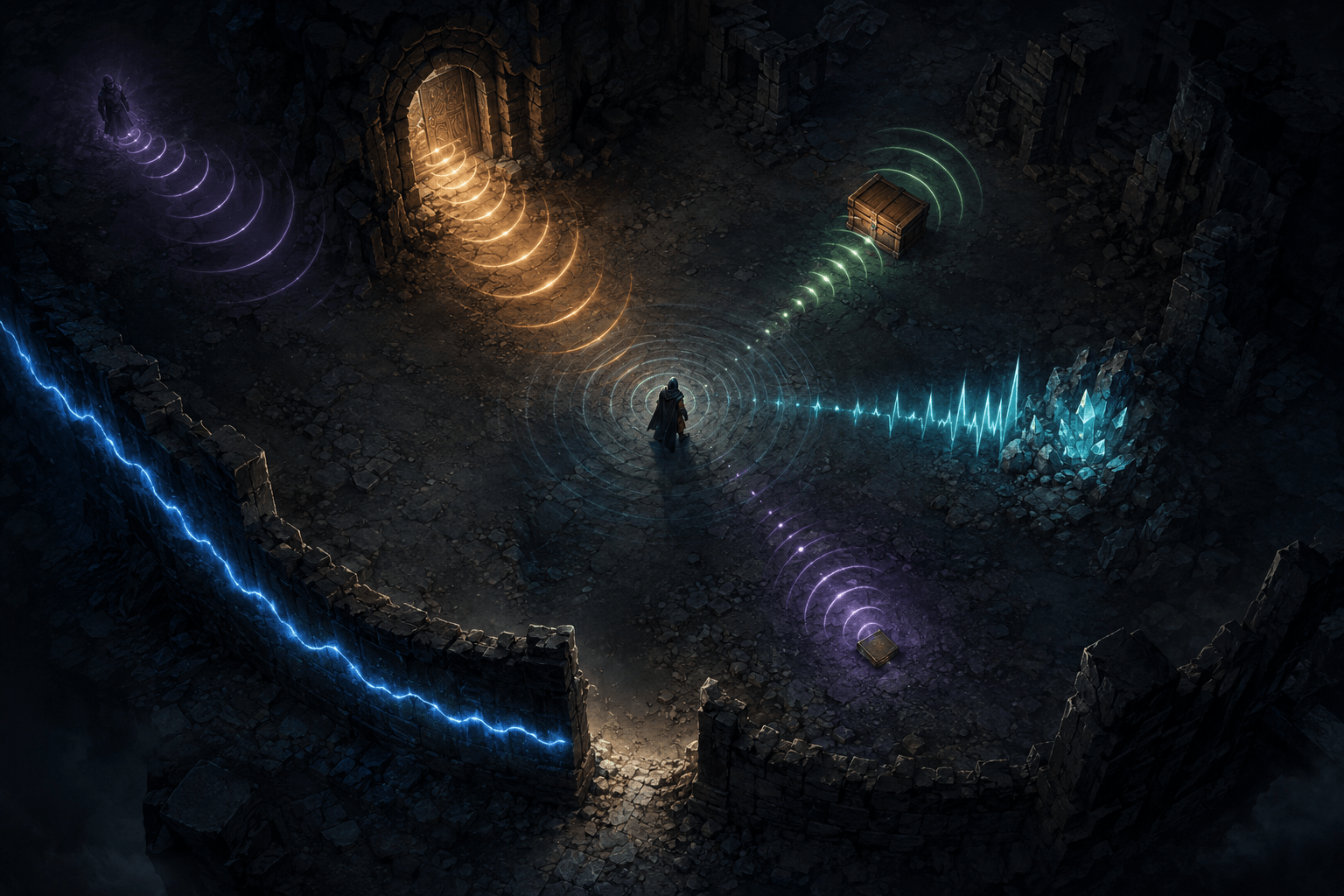
Exploring an open three-dimensional game world requires more than knowing which direction contains the current objective. Players continually build a mental model of nearby doors, walls, passages, containers, people, obstacles, and collectible objects. In The Elder Scrolls V: Skyrim Special Edition, most of that environmental information is communicated visually.
Skyrim Access is a third-party accessibility mod designed for blind and visually impaired players. Its larger feature set includes menu narration through NVDA, an object scanner, combat assistance, autowalk, puzzle support, and spoken interface information. One particularly unusual part of the mod converts the player’s immediate surroundings into spatial sound.
The mod’s 3D ambient sound radar plays short positional cues from nearby objects. A separate wall-sound option creates a continuous hum along physical boundaries. An audio beacon can then mark one selected object with a repeating positional sound. Together, these systems offer three different kinds of environmental information: an overview of nearby objects, continuous feedback about surrounding geometry, and focused guidance toward a chosen target.
The sound radar creates an audible survey of nearby objects
When enabled, the 3D ambient sound radar periodically sweeps the area around the player. Nearby objects emit short sounds from their actual positions in the game world. The mod uses three-dimensional HRTF audio so that the cues convey direction through spatial placement, including panning and perceived distance.
The result is not a spoken list. Instead of hearing a sequence such as “door left, chest ahead, potion right,” the player hears different cues located around the listening position. A sound originating to the right may indicate an object on that side, while another cue farther ahead may communicate both a different object and a different distance.
Skyrim Access assigns separate cues to several object categories. The documented types include doors, containers, weapons, armour, ammunition, books, keys, soul gems, ingredients, scrolls, potions, miscellaneous items, non-player characters, and ore veins. Ore veins have their own sound rather than sharing a generic activator cue, allowing mineable deposits to be distinguished from unrelated interactive objects.
This category-based approach reduces the need to speak every object name during each sweep. A familiar sound can identify the general kind of object while its spatial position indicates where it is. The player can then decide whether that category deserves closer investigation.
The radar therefore supplies an environmental overview rather than exhaustive object identification. It may reveal that a container is nearby, but it does not necessarily communicate the container’s exact name, contents, ownership status, or relevance to a quest. Those details require other parts of the mod or an interaction with the object.
Learning the cues is part of using the system
An audio vocabulary is useful only when its meanings can be learned and recalled. Skyrim Access includes a sound glossary in its Mod Configuration Menu, commonly called the MCM. Each sound is listed by name, and selecting an entry plays it. This allows players to practise identifying cues outside the pressure and overlap of normal exploration.
The glossary distinguishes recognition from navigation. Hearing a sound clearly does not guarantee that a new user knows whether it represents armour, a book, or an ore vein. Providing a way to replay each cue can support deliberate learning rather than expecting players to infer the complete sound set during play.
Individual experience with this vocabulary may vary. Some players may quickly associate the cues with object categories. Others may need repeated practice or may find that particular sounds are too similar. Memory, hearing, auditory processing, equipment, environmental noise, and the number of simultaneous cues can all affect how usable the system is.
The mod does not remove the need to interpret the environment. It changes the channel through which some environmental information is communicated. The player still decides which sound matters, where it originated, and what to do next.
Radar configuration can reduce unnecessary audio
Populated rooms in Skyrim can contain many objects. A system that sonified every item continuously could become difficult to interpret, particularly when dialogue, music, combat, footsteps, and other game sounds are also playing.
Skyrim Access therefore provides a dedicated MCM page for its sound radar. Players can change the master volume, detection radius, interval between sweeps, and number of sounds played during each sweep. Object types can also be enabled or disabled individually, with separate volume controls for each category.
These controls allow the radar to be narrowed to the information a player currently values. Someone searching a dungeon for doors and containers could disable sounds for dropped weapons or miscellaneous items. A player looking for crafting materials might retain ore, ingredient, and container cues while reducing less relevant categories.
This is filtering rather than simplification of the underlying world. The disabled objects continue to exist and can still affect play; the radar simply stops announcing their presence through that channel. A narrow configuration may make the remaining sounds easier to separate, but it can also hide an object the player later needs.
Detection radius creates a similar trade-off. A larger radius can provide earlier notice of distant objects but may produce a denser soundscape. A smaller radius limits the amount of simultaneous information, although objects will not be represented until the player moves closer. The most useful balance may change between an open landscape, a shop, a dungeon, and a room filled with loose items.
Wall sound represents boundaries rather than objects
The radar identifies discrete environmental objects. It does not, by itself, describe the complete shape of the room or tell the player where an uninterrupted wall ends. Skyrim Access addresses that different navigation problem through its wall-sound feature.
When wall sound is enabled, nearby walls and obstacles produce a continuous, spatially positioned hum. The sound is attached to the detected surface and moves along it as the player changes position. Following the hum can help the player track a physical boundary without repeatedly colliding with it.
An opening is represented through the absence of the wall sound. When the continuous boundary reaches a doorway or corridor, the gap in the hum can indicate that the surface no longer continues there. This uses contrast between sound and silence rather than assigning another isolated cue to every passage.
The system does not rely only on objects explicitly named “wall.” It uses 16 physics rays around the player to detect nearby obstacles in multiple directions. According to the mod documentation, this can include rocks, buildings, and cliffs as well as constructed interior walls.
Wall sound is disabled by default. The creator describes it as an immersive effect that may not suit everyone, so it must be turned on through the MCM. Players can adjust its volume, detection range, and the number of walls that hum simultaneously. Its documented default detection range is approximately three metres, with two wall sounds active at once.
Continuous feedback has an auditory cost
The wall hum differs from the radar’s brief, periodic cues. Because it continues while a boundary remains nearby, it can provide stable orientation during movement. That persistence can also add a substantial layer to the game’s soundscape.
A continuous hum may compete with speech, combat cues, environmental ambience, music, or the radar itself. It may also be uncomfortable for players who are sensitive to sustained sounds or who have difficulty separating overlapping audio streams. Leaving the feature disabled by default acknowledges that environmental sonification can create a sensory cost even when it supplies useful information.
The volume and wall-count controls can reduce that cost, but reducing feedback can also reduce spatial coverage. Hearing only one or two boundaries may be easier to process than hearing every nearby surface, yet it cannot communicate the complete shape of a complicated room at once.
The system also depends on the game’s collision geometry. A physics ray detects an obstacle, not its architectural meaning. A rock, railing, irregular ruin, invisible collision boundary, or cluttered surface may produce feedback that requires interpretation. Wall sound should therefore be understood as proximity information about detected surfaces, not as a precise verbal floor plan.
The audio beacon narrows attention to one target
The radar and wall sound describe multiple parts of the environment. When the player needs to reach one particular object, Skyrim Access provides an audio beacon.
Pressing Shift+O marks the object currently selected by the mod’s scanner. A continuous three-dimensional sound then plays from that object’s location. Pressing the same command while the object remains selected clears the beacon. In version 1.9.0, the beacon repeats every second rather than leaving five-second gaps between sounds.
The beacon reduces the search from many possible cues to one persistent reference point. A player can turn toward it, move, listen to the change in its position, and correct direction while approaching. Because the sound remains attached to the target, it may support active travel in a way that a single spoken direction cannot.
This remains navigation guidance rather than route automation. The beacon identifies a target’s direction but does not necessarily calculate a safe path around stairs, walls, hazards, locked doors, or changes in elevation. A direct line toward the beacon may be obstructed.
The mod’s full object readout can supplement the beacon. Pressing O announces information about the scanner’s current object, including its name, position relative to the camera, angle, compass direction, distance, elevation difference, and coordinates. The beacon can then provide continuous spatial guidance after the spoken description.
Spatial guidance is different from autowalk
Skyrim Access also includes autowalk, but it should not be confused with the sound radar or beacon. Sonification gives the player information with which to navigate. Autowalk delegates part of the navigation action to the mod.
Version 1.9.0 allows autowalk to travel toward a locked target and improves travel to distant quest objectives, including movement through appropriate exits. The player can therefore choose between manually following sound and allowing the mod to perform more of the route traversal.
That distinction may matter to players who want environmental information without automatic movement. Some may prefer to retain direct control and use the radar, wall hum, object readout, and beacon as assistance. Others may encounter barriers that make manual navigation impractical and may benefit from autowalk. The systems support different levels of intervention rather than representing interchangeable ways to do the same thing.
A mod-dependent PC accessibility system
Skyrim Access is not a built-in Bethesda accessibility option. It is an SKSE plugin for compatible PC editions of Skyrim Special Edition, Anniversary Edition, and, according to the creator’s current description, Skyrim VR. The mod uses NVDA for speech output and lists SKSE and SkyUI among its associated requirements.
Installation is more involved than enabling an in-game setting. The current instructions direct players to install the mod through Vortex or Mod Organizer 2 and manually copy nvdaControllerClient.dll from the downloaded archive into the main Skyrim installation directory beside SkyrimSE.exe. NVDA must be installed and running for speech output to work.
Version 1.9.0 also merged Skyrim Access with the formerly separate Skyrim Accessibility mod. Players updating from an older setup are instructed to remove both previous mods and delete the old SkyrimNVDA.dll before installing the merged release. Leaving the older components installed may produce duplicate functionality or conflicts.
These dependencies create barriers that would not exist with a native feature. Players must manage a compatible game build, external mod tools, SKSE, SkyUI, NVDA integration, files placed in the correct directory, and possible interactions with other mods. The feature is not available through the standard console versions of the game.
What the sound systems do not communicate
The radar is not a complete substitute for vision or comprehensive environmental description. It represents supported object categories within its detection area, but it does not narrate every visual property, architectural detail, animation, hazard, or scene composition.
Wall sound communicates detected boundaries without explaining what the boundary looks like or why it exists. The beacon indicates the position of one selected target without guaranteeing an unobstructed route. None of these features automatically makes every mod-added object recognizable, every puzzle understandable, or every quest independently navigable.
The creator notes that some highly visual quests and puzzles can remain difficult, including alignment riddles and platforms hidden in darkness. Skyrim Access provides workarounds through features such as teleportation, the console, automatic puzzle solving, and guided sequences, but a workaround is not equivalent to accessible participation in the original interaction.
The current [Skyrim Access page on Nexus Mods](https://www.nexusmods.com/skyrimspecialedition/mods/181131) contains the download, version-specific installation instructions, changelog, configuration details, and reporting channels. Checking that page before installation is important because game versions, loaders, dependencies, and mod behaviour can change.
An audible environment rather than a spoken checklist
Skyrim Access’s sound radar, wall hum, and audio beacon divide environmental access into complementary layers. The radar surveys nearby object categories, wall sound represents continuous physical boundaries, and the beacon holds attention on one chosen location. Spoken object readouts and optional autowalk can add detail or assistance when spatial audio alone is insufficient.
These systems may reduce dependence on visual scanning, but they introduce learning, configuration, installation, and auditory-processing demands of their own. Access needs vary, and their practical usefulness depends on whether a player can distinguish the cues, manage the resulting soundscape, interpret the detected geometry, and use the mod’s remaining navigation tools when spatial audio cannot describe the route.