
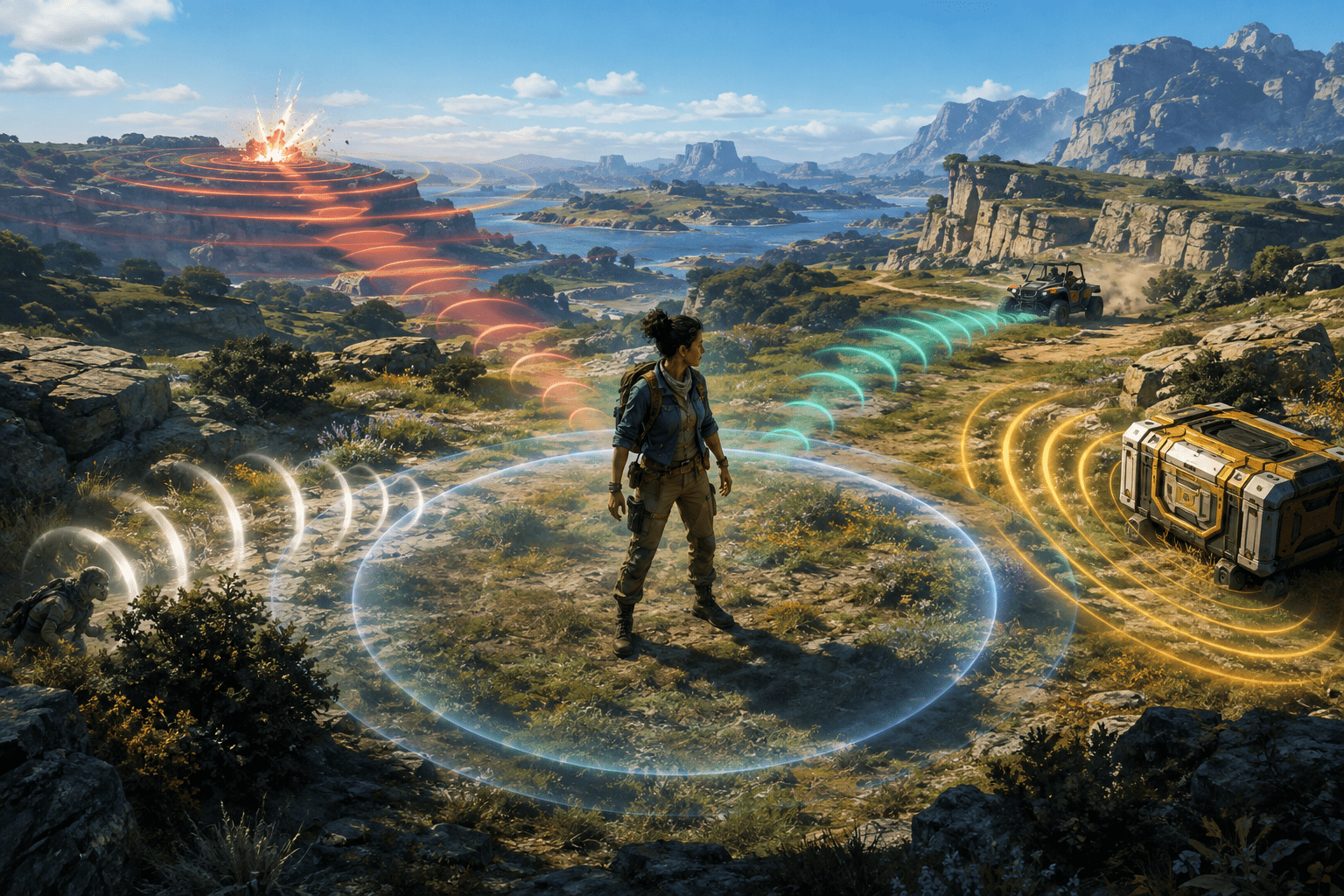
Sound provides a large part of the situational information in Fortnite. Players may hear another person approaching before seeing them, use distant combat to decide where to travel, locate a nearby supply container by its hum, or notice a vehicle entering the area from outside the camera view.
Visualize Sound Effects converts selected proximity-based sounds into visual indicators. When an eligible sound occurs, a partial radial cue appears around the central area of the display. Its position points toward the sound source, while its symbol and visual treatment help identify the general type of event.
The setting may provide access to spatial information for deaf and hard-of-hearing players. It may also support players who have difficulty separating important effects from music, dialogue, environmental sound, or several simultaneous audio sources.
It is not a complete captioning system. The indicator does not transcribe speech, name every sound, describe the full environment, or guarantee that all audio carrying useful information will be represented.
The radial position communicates direction
Traditional subtitles normally appear in a fixed part of the display. They can identify dialogue or a sound in words, but a fixed caption does not inherently show where its source is located.
Fortnite places its visual sound cues around the player’s central field of attention. A cue appearing toward the left points to a source in that direction. A cue moving around the radial area can reflect the changing relationship between the player’s orientation and the source.
This is particularly relevant in a third-person game. The camera shows a limited portion of the surrounding environment, while nearby players and events can exist behind the character, above or below a structure, or beyond an obstacle.
The indicator can tell the player which way to investigate without rotating the camera through every direction. It does not provide an exact navigable route. A sound shown to the right might originate inside a building, on another floor, behind a hill, or beyond an obstruction.
Symbols distinguish broad sound categories
Direction alone would not explain whether a sound represents a nearby player, a moving vehicle, a supply source, or combat. Visualize Sound Effects uses different symbols and animated treatments for supported categories.
Commonly represented Battle Royale sounds include footsteps, gunfire, moving vehicles, gliders or descending players, and nearby containers that emit characteristic audio. The exact set can change as Epic adds or removes items, vehicles, movement systems, and seasonal mechanics.
These indicators provide classification rather than a detailed description. A footstep symbol signals relevant movement but does not identify the player, their equipment, health, or intentions. A gunfire cue does not explain which weapon is being used with complete precision or whether the person firing is an ally, opponent, or participant in a distant fight.
The player must interpret each cue in context. An indicator can draw attention toward a direction, but decisions about hiding, approaching, building, escaping, or preparing for combat remain with the player.
Visual sound effects are not subtitles
Subtitles represent spoken language in text. Captions can extend that approach by describing meaningful non-speech sounds. A caption might state that footsteps are approaching or that gunfire is occurring in the distance.
Visualize Sound Effects takes a more spatial and symbolic approach. It prioritizes rapid direction and category recognition instead of presenting a written sentence. This reduces the amount of text that must be read during a fast encounter.
The trade-off is reduced detail. A symbol may be faster to recognize after it has been learned, but it cannot express the same nuance as a carefully written caption. The feature does not replace dialogue subtitles, voice-chat transcription, or text alternatives for spoken team communication.
Players who use subtitles should generally evaluate them separately. Story dialogue, character speech, and other linguistic content require different settings from proximity-based combat indicators.
Visual cues differ from 3D audio
Epic describes 3D audio as a feature that may help headphone users pinpoint the direction of enemies. Spatial audio communicates location by changing how a sound is presented between the ears and according to its apparent position.
Visualize Sound Effects expresses selected spatial information on the screen. It does not require the player to distinguish direction through stereo hearing, and it may remain useful with television speakers, mobile speakers, mono output, reduced volume, or muted gameplay.
The two systems can provide redundant information rather than serving as mutually exclusive replacements. A player who can hear some effects may use spatial audio together with visual indicators. The sound supplies its ordinary character and distance qualities, while the visual cue reinforces category and direction.
That combination may also be demanding. Receiving the same event through loud audio, a central animation, controller feedback, and other combat effects can increase sensory load. Players may need to adjust volume, music, interface, and vibration settings around the visualizer.
The indicators represent selected sounds, not every sound
Epic’s official instructions carefully describe the setting as providing a radial indicator for “some sounds.” That limitation is fundamental to how it should be understood.
The game contains music, ambient wildlife, weather, dialogue, emotes, item effects, building sounds, environmental interactions, vehicles, weapons, movement, and mode-specific events. Not every audible detail receives a visual equivalent.
A sound may be excluded because it is decorative, because another visual effect already communicates it, or because the current mode does not expose it to the visualizer. The player cannot assume that the absence of an indicator means the surrounding area is silent or safe.
The supported set can also vary among experiences. Fortnite now includes Battle Royale, Zero Build, LEGO experiences, Festival, creator-made islands, and other activities with different mechanics. A custom experience can introduce sounds that do not map to the standard indicator categories.
Direction does not always provide vertical precision
Multilevel buildings create an important limitation. A radial cue can point toward footsteps that are horizontally close while leaving the player to determine whether the source is above, below, or on the same floor.
Ordinary audio may contain subtle vertical and material information, such as the difference between movement on a roof and movement in a room. A symbolic indicator cannot necessarily reproduce every one of those distinctions.
This means the feature supports localization without providing complete spatial mapping. Players may still need to inspect stairways, ceilings, nearby structures, or terrain to determine the source’s precise position.
The same issue applies to objects separated by walls. The radial cue points toward the source rather than tracing an accessible route around the obstruction. It is guidance, not route automation.
Distance is communicated less precisely than position
The appearance and intensity of a cue can help suggest whether a supported sound is becoming more immediate, but the visualizer is not a numerical distance meter. It does not provide a value in metres or predict how long it will take a source to arrive.
Different sound categories also become relevant at different ranges. Distant combat may be represented from farther away than quiet footsteps. A player cannot compare every icon as though it uses one universal measurement scale.
Terrain, structures, source movement, and changes made through live updates can affect when a cue appears. The indicators should therefore be treated as awareness information rather than exact tracking.
A source can also stop producing an eligible sound. A stationary opponent may no longer generate footsteps even though they remain nearby. The disappearing cue does not mean the person has ceased to exist.
It does not identify friend and opponent communication
Visualize Sound Effects is concerned with environmental and gameplay audio, not the linguistic content of voice chat. It does not transcribe a teammate’s instructions or show a symbolic equivalent for every spoken warning.
Party and game voice channels remain separate systems. Deaf and hard-of-hearing players may require text chat, pings, map markers, or communication outside voice chat to coordinate with teammates.
Some represented sounds can also originate from teammates or other non-hostile sources. A footstep or vehicle cue supplies category and direction, but not necessarily ownership. The player must combine it with team markers, the map, visible character information, and knowledge of the situation.
Visual sound access therefore does not make team communication fully accessible by itself. It improves awareness of selected world events rather than translating conversation.
Visual load is the principal trade-off
Fortnite already presents a substantial amount of visual information. The display can include health and shields, inventory, ammunition, a map, markers, storm information, objectives, team status, building elements, effects, and moving characters.
Visualize Sound Effects adds animated cues near the central area where the player is also aiming and tracking movement. When several eligible sounds occur at once, multiple indicators can compete for attention.
This may support players who prefer visual information while creating additional difficulty for someone with visual-processing, attention, migraine, or sensory-overload concerns. A cue that is easy to recognize in a quiet location may become harder to interpret during a crowded fight.
The setting does not provide extensive user-facing controls for independently resizing, repositioning, recolouring, or filtering every sound category. It is primarily an On or Off choice. Players cannot simply keep footsteps while removing every supply or vehicle cue through the standard setting.
The feature can affect stealth expectations
Footsteps and other eligible movement sounds ordinarily depend on the source making sufficient noise. Visualizing those sounds can make the resulting information easier to notice than relying on audio alone.
This does not reveal a completely silent or stationary player. Crouching, stopping, distance, and other game mechanics can still affect whether an eligible sound is produced and whether a cue appears.
Because Fortnite is a live competitive game, Epic can adjust the range, opacity, and behaviour of indicators as part of game balance. An article or video showing an older season may not represent the current detection behaviour.
The setting should not be framed as an unrestricted enemy detector. It visualizes supported sounds generated by the game; it does not independently locate every opponent.
Technical problems can interrupt the visual information
Epic currently acknowledges a PC issue that can cause Visualize Sound Effects to appear glitchy or stop working. The same problem can affect other visual feedback, including hit markers and weak-point effects.
Epic’s support guidance recommends ensuring that graphics drivers are current. Another version of its support notice suggests switching the PC rendering mode to Performance as a temporary workaround while the issue is investigated.
This is a meaningful accessibility limitation. When a player depends on the indicators, a graphical fault is not merely cosmetic; it can remove information used for navigation and threat awareness.
Players should not assume they have failed to configure the option correctly if several types of visual feedback malfunction together. Updating the game and graphics driver, testing an alternate rendering mode, and reviewing Epic’s current support notices may be necessary.
Cross-platform availability is broad
Epic currently supports Fortnite on Windows PC; PlayStation 4, PlayStation 4 Pro, PlayStation 4 Slim, PlayStation 5, and PlayStation 5 Pro; Xbox One models and Xbox Series X|S; Nintendo Switch, Nintendo Switch Lite, and Nintendo Switch 2; supported Android devices; and supported iPhones and iPads.
The Visualize Sound Effects option is part of Fortnite rather than a third-party mod. Epic’s instructions place it in the Audio settings, where it can be turned On and applied from the lobby.
Screen size affects practical usability. Indicators that are clear on a television or monitor may be more difficult to distinguish on a phone or handheld display. Resolution, HUD scale, display contrast, and viewing distance can also affect perception.
Cloud streaming may add compression or latency and can depend on the provider and device. Although the setting is generated by the game, the final visual presentation may not be identical across every screen and delivery method.
A directional translation, not complete audio replacement
Epic’s official Visualize Sound Effects instructions describe the feature as a radial visual indicator for selected sounds. That concise description captures both its strength and its limit.
The setting can make the direction and broad category of important proximity sounds available without relying entirely on hearing. It can be combined with subtitles, ordinary audio, 3D audio, team markers, and text-based communication.
Access needs vary, however. Visualize Sound Effects does not caption every sound, transcribe voice chat, provide exact distance or vertical location, identify every source, or remain immune to live-service changes and technical faults. Its additional central animations can also create visual or cognitive costs while reducing an auditory barrier.