
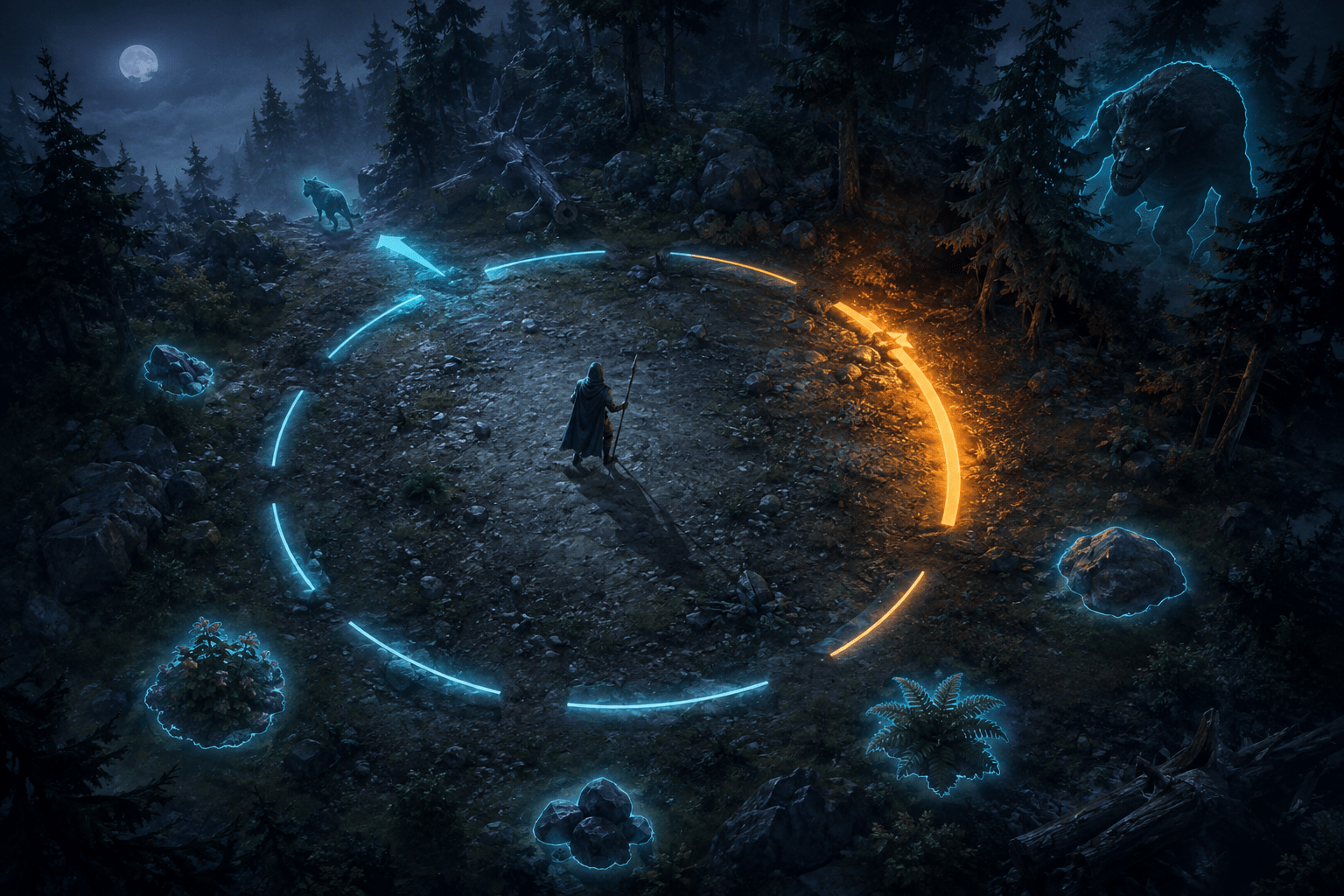
Detecting danger in Valheim can require several forms of perception at once. A player may hear an enemy before seeing it, determine which direction the sound came from, identify movement among dark trees or dense fog, judge whether the creature is dangerous, and respond before it reaches striking distance.
PIXPIX’s third-party Accessibility mod provides a connected group of awareness tools for these tasks. Its central feature is a segmented threat radar ring that indicates the direction of nearby creatures. Threat weighting changes the strength of the response, while audio-priority logic can give additional importance to creatures producing audible cues.
The mod can reinforce that ring with highlighted creature silhouettes, nearby-item indicators, gamepad vibration, and an optional proximity-based screen shake. These channels do not all provide the same information, and they do not automatically defend the player. Together, they can make nearby hazards and objects more noticeable through direction, intensity, outline, color, and touch.
A directional ring rather than a conventional minimap
The threat radar is arranged as a segmented ring around the player’s position. Different sections correspond to different directions in the surrounding environment. When a detected creature occupies one of those directions, the relevant part of the ring can respond.
This differs from a detailed minimap. The ring is designed to answer a narrower question: where is a nearby creature relative to the player? It does not reproduce the terrain, calculate a complete route, or display every environmental landmark.
A segmented display can reduce the precision required to interpret a cue. Instead of estimating an exact angle from stereo audio, the player can recognize that activity is ahead, behind, or toward one side. That may support players who cannot reliably localize sound or who lose track of threats outside the visible camera area.
The ring does not turn the camera toward the creature. The player must still choose whether to turn, retreat, block, attack, or continue moving. It provides navigation guidance toward the source, not route automation or automatic target selection.
Configurable detection range
The radar’s detection radius can be configured. Increasing it allows the system to respond to creatures farther from the player, while reducing it limits the display to a more immediate area.
A larger range is not automatically more accessible. Detecting many distant creatures can fill several segments simultaneously and make it harder to identify the most relevant threat. The player may also receive information about creatures that are separated by terrain or are unlikely to interact with them.
A shorter range reduces visual activity but provides less advance warning. In a dense forest, dungeon, or area with fast enemies, the player may have less time to interpret the ring and respond.
The useful setting depends on the player’s reaction time, screen size, visual attention, preferred pace, and tolerance for persistent indicators. It may also depend on the biome. A value that works in an open field may be less useful inside a narrow structure with enemies in several adjacent rooms.
Threat weighting adds urgency, not just presence
The mod uses threat weighting so that detected creatures do not all contribute identically to the radar. More dangerous creatures can produce a stronger response.
This adds an information layer beyond simple proximity. A small passive or relatively weak creature and a powerful hostile creature may occupy similar distances but require different levels of attention. Threat intensity can help the player distinguish those situations.
The effect should not be interpreted as a complete tactical assessment. The mod cannot know the player’s current health, equipment, skill, stamina, available escape route, or personal difficulty with a particular enemy as precisely as the player can. A creature classified as a stronger threat by the system may not be the most dangerous element in every individual encounter.
Threat weighting also does not replace identification. A strong radar segment communicates urgency and direction, but the player may still need the silhouette, icon, environment, or direct view to determine which creature is present.
Audio-priority weighting converts sound into visual emphasis
The system includes audio awareness synchronization and audio-priority weighting. Creatures producing audible cues can receive additional emphasis through the awareness display.
This creates a cross-sensory connection. A sound that might ordinarily alert the player through hearing can affect the visual radar. For a deaf or hard-of-hearing player, the visual response may make part of that event available through another channel.
For someone who hears the cue but cannot localize it, the ring can add directional context. For someone who finds multiple overlapping sounds difficult to sort, the visual emphasis may help connect a sound event with a section of the surrounding space.
This is not a full sound visualizer. The mod’s documentation describes creature and threat awareness, not captions for speech, weather, tools, building damage, music, or every environmental sound. It should not be represented as translating the entire soundscape.
Audio weighting is also not the same as showing exact distance. A brighter or more intense response may combine several factors, including danger, proximity, and current audio activity. Players should learn how the configured ring behaves rather than assuming every intensity change has one fixed meaning.
Silhouettes make creatures distinct from their surroundings
The mod can add silhouette highlighting to creatures and supported interactable objects. These highlights can make a subject visually distinct from dark terrain, vegetation, fog, complex structures, or similarly colored backgrounds.
Silhouette support addresses a different barrier from the directional ring. The ring can indicate where to look, while the silhouette can help identify the relevant form after the player turns toward it.
This is guidance rather than automatic targeting. The outline does not move the reticle, select an attack, or guarantee that the player will recognize the creature. It increases separation between the subject and its surroundings.
The mod provides preset silhouette colors including magenta, cyan, yellow, and red, along with a custom option. Players can adjust the RGB intensity multiplier and retain configurable alpha transparency.
Color choice should be based on contrast within the actual environment rather than a universal assumption about a particular color-vision deficiency. A bright red outline may stand out in snow and disappear among fire or autumnal scenery. Cyan may contrast strongly in one biome and blend into cold lighting in another.
The option to change both color and intensity is therefore more useful than a single fixed “colorblind” palette. It allows the player to respond to their perception and the game’s changing environments.
Opacity and intensity have different effects
Intensity determines how strongly the selected color is presented, while alpha transparency affects how much of the underlying image remains visible. These controls can alter the prominence of the silhouette without requiring one fixed visual treatment.
A highly opaque, intense outline can be easier to notice but may cover details needed to identify an animation or body position. A subtler highlight preserves more of the original presentation while demanding more visual search.
Increasing every highlight to maximum intensity can also make a crowded encounter visually overwhelming. If several creatures are present, multiple strong silhouettes may compete with the threat ring, effects, terrain, and combat feedback.
The current mod supports live color and intensity updates. This can make experimentation more practical because the player can evaluate changes without relying exclusively on repeated file editing and restarts, provided a compatible configuration interface is installed.
Bumper indicators highlight nearby items
The mod’s bumper indicators apply highlighting to nearby items. They provide another form of proximity awareness, but their subject is environmental objects rather than creature threats.
An item can be difficult to notice when it is small, partially concealed by vegetation, placed against a similar texture, or positioned near the edge of the camera. A bumper-style highlight can make its presence more apparent.
This may reduce visual searching during gathering and exploration. It does not automatically collect the item, move the character toward it, identify every object in text, or determine whether the item is useful.
Bumper indicators have independent color presets and intensity controls. This allows item highlights to be distinguished from creature silhouettes. For example, a player might use one high-contrast color for threats and another for resources.
If both systems use similar colors and intensities, the distinction can become less clear. The player should consider not only whether a highlight is visible but whether its meaning is recognizable under time pressure.
Multiple channels can reinforce one another
The radar, threat weighting, audio synchronization, silhouettes, and bumper indicators form a layered awareness system. Each channel answers a different part of the situation.
The ring indicates direction. Intensity can suggest urgency. Audio priority connects a creature’s sound activity to visual emphasis. A silhouette helps separate the creature from the environment. Bumper indicators distinguish nearby objects from those threats.
Redundancy can reduce dependence on any single sensory channel. A player who misses the silhouette might notice the radar segment. A player who cannot use the audio cue may receive the ring and outline. A player who hears the creature may use that sound together with the visual direction.
More channels can also create more visual and sensory load. A heavily configured display may contain several ring segments, highlighted creatures, glowing items, vibration, screen shake, combat effects, and the original interface at once.
The mod is modular, so players do not need to enable or intensify every feature. Accessibility is not measured by the number of active overlays. A smaller combination may provide clearer information than the full suite.
Gamepad vibration adds a tactile channel
Version 0.6.0 added gamepad support and vibration. Tactile feedback can provide another way to notice nearby activity without relying exclusively on the display or audio.
Vibration may support players who benefit from redundant physical cues. It can also be distracting, painful, fatiguing, or difficult to interpret. A vibration communicates that an event has occurred, but it may not provide the same directional precision as a segmented visual ring.
Controller compatibility is not equivalent to full remapping or adaptive-controller support. The mod’s addition of gamepad operation does not establish compatibility with every controller, switch interface, or remapping layer.
Players who do not want haptic output should verify the relevant configuration rather than assuming vibration is required for the awareness system.
Optional screen shake has a significant sensory trade-off
The mod can generate camera shake according to the proximity of dangerous creatures. The detection radius and maximum intensity can be adjusted, and the feature can be disabled.
Proximity-based shake may create a nonvisual-symbolic warning. The camera movement becomes stronger as danger approaches, potentially making urgency noticeable without reading a ring segment.
For other players, screen shake can cause disorientation, nausea, headache, eyestrain, or difficulty aiming. Adding camera motion as an accessibility signal can therefore create a barrier even while supplying information.
The fact that the feature is optional is essential. It should not be treated as the default or universally helpful form of threat feedback. Players who use the radar or silhouettes do not need to accept additional camera movement.
Reducing the maximum intensity is not the same as disabling shake. A low value still moves the viewpoint. Players who require a stable camera should turn the feature off completely and use the other awareness channels.
Light Aura addresses visibility through illumination
Version 0.6.0 also added Light Aura, a player-centered light with configurable intensity and range. An assignable hotkey can turn it on or off.
Light Aura is related to the awareness system because environmental darkness can prevent the player from using the information provided by the radar. The ring may indicate a creature’s direction, but the surrounding terrain, obstacles, and escape route must still be visible.
The light does not mark a route or reveal the entire biome. It follows the player and illuminates the immediate area according to its configured range.
Additional light may reduce low-contrast barriers while altering the atmosphere, stealth conditions, or intended darkness of an area. The project page describes it as a client-side feature, but players should still test how it affects their preferred visual presentation.
Hotkeys and gamepad operation
The current release includes configurable hotkeys for silhouettes, bumper indicators, and Light Aura. This allows the player to enable or disable those systems without navigating through the complete configuration each time.
Temporary control can be useful when an overlay becomes visually crowded. A player may activate silhouettes in a dark dungeon, turn them off while building, and use item indicators during gathering.
A hotkey can itself be inaccessible if it requires an uncomfortable reach or conflicts with another action. Gamepad support expands the available input route, but the final usefulness depends on whether the relevant controls can be assigned to accessible buttons.
The mod documentation does not describe voice control, automatic context-based switching, or support for every alternative-input system. Hotkey availability is not the same as universal physical access.
Configuration and interface requirements
The suite is configured through BepInEx settings. The creator strongly recommends an in-game configuration manager, which can make radar range, colors, intensity, shake, and Light Aura values easier to change.
Without such an interface, players may need to edit BepInEx configuration files. That requires locating the file, understanding the property names, entering valid values, and restarting or reloading as necessary.
The number of adjustable features can be beneficial but cognitively demanding. A practical approach is to begin with the threat ring, select a comfortable detection radius, and then add one redundant channel at a time.
Testing one change at a time makes it easier to determine whether an outline, vibration, or proximity effect is useful. Enabling the entire suite immediately can make it difficult to identify which setting is responsible for clutter or discomfort.
Client-side and multiplayer behavior
The creator describes Accessibility as a client-side mod. It does not need to be installed on a multiplayer server, although it is documented as safe if present on a dedicated server.
This reduces the coordination required to use the mod with friends. Other players do not need to adopt the same overlays or configuration for one person to use them.
Client-side operation does not mean every server community will treat all assistance identically. Threat detection range, silhouettes, and environmental highlighting can expose information more explicitly than the original presentation. Players joining organized competitive environments should review the applicable rules.
Mods that replace or heavily modify the HUD, radar, highlighting, or rendering systems may conflict. A client-side installation also remains vulnerable to incompatibility after game updates.
Installation and platform limits
Accessibility requires BepInEx. Manual installation places the mod’s DLL in the BepInEx/Plugins folder, while compatible mod managers can handle the package and dependency.
This is an unofficial mod for the moddable PC version of Valheim. It does not add the awareness system to the Xbox or other console editions. Cross-platform multiplayer does not transfer a PC client’s mod to a console player.
The creator’s official Accessibility page on Thunderstore provides version 0.6.0, its BepInEx dependency, configuration overview, server notes, screenshots, and changelog. The Nexus page and public repository provide additional original project references.
Players should confirm the current Valheim and BepInEx versions before installation. Keeping the mod manager profile or plugin folder recoverable makes it easier to disable the suite if a game update introduces errors.
Awareness assistance without automatic defense
PIXPIX’s Accessibility mod makes nearby activity available through several connected signals. The threat ring provides direction, weighting adds relative urgency, audio synchronization converts some creature sounds into visual emphasis, silhouettes improve separation, and bumper indicators make nearby objects more apparent.
The system does not navigate, fight, block, collect resources, identify every environmental sound, or guarantee that all creatures and modded objects are supported. Its optional vibration and screen shake can also create sensory costs, while extensive overlays may increase visual load.
Access needs vary. The mod may reduce dependence on sound localization and rapid visual searching, but its practical value depends on careful configuration, environmental contrast, server rules, compatible hardware, and selecting only the awareness channels that remain usable for the individual player.