
Rapid-button prompts require the same button to be pressed repeatedly within a short period. Some games provide alternatives that replace tapping with a sustained hold or complete the sequence automatically.
Access needs and preferences vary. These settings also have different scopes: some affect most repeated-button prompts, while others apply only to specific actions.
God of War Ragnarök
God of War Ragnarök includes a Repeated Button Presses setting with Tap and Hold options. Selecting Hold allows multi-press actions to progress while the prompted button remains held.
The setting does not automatically complete every input challenge. Precision minigames use a separate Mini-Game Style setting, while aiming, blocking, sprinting, and menu holds have their own controls.
The feature is documented for PlayStation 4 and PlayStation 5. God of War Ragnarök is also available on PC, where current accessibility options should be checked for platform differences.
Official source: https://www.playstation.com/en-us/games/god-of-war-ragnarok/accessibility/
The Last of Us Part I
The Last of Us Part I allows Repeated Button Presses to be changed from Tap to Hold. With Hold selected, the player keeps the prompted button pressed rather than tapping it repeatedly.
Melee Combos have a separate Tap or Hold setting. Changing the general repeated-press option does not automatically change how melee combinations are performed.
The feature is available on PlayStation 5. PlayStation confirms that the PC release also includes Part I’s accessibility suite.
Official feature list: https://blog.playstation.com/2022/08/26/the-last-of-us-part-i-full-list-of-accessibility-features/
PC accessibility confirmation: https://blog.playstation.com/2023/03/09/the-last-of-us-part-i-pcs-features-and-specs-detailed/
Star Wars Jedi: Survivor
Star Wars Jedi: Survivor uses a Button Mash Options setting. Players can choose Default or Automatically Succeed for button-mashing sequences and quick-time events.
This is automatic completion rather than a hold alternative. Toggle Hold Pull, which changes how the Force Pull action is maintained, is a separate control and should not be confused with the button-mash setting.
EA documents the feature for PC, PlayStation 5, and Xbox Series X|S. The game should be fully updated because EA notes that some accessibility settings were added or expanded after release.
Official source: https://www.ea.com/able/resources/star-wars/star-wars-jedi-survivor
Prince of Persia: The Lost Crown
Prince of Persia: The Lost Crown generally avoids conventional quick-time events, but escaping from a frozen state normally requires repeated button presses.
The Auto Unfreeze option automatically completes that specific action. It does not automate combat attacks or remove every timed input elsewhere in the game.
Ubisoft documents the setting for PC, Mac, Nintendo Switch, PlayStation 4, PlayStation 5, Xbox One, and Xbox Series X|S. It can be found in the Gameplay menu.
Official source: https://www.ubisoft.com/en-us/help/prince-of-persia-the-lost-crown/gameplay/article/accessibility-features-in-prince-of-persia-the-lost-crown/000106499
Split Fiction
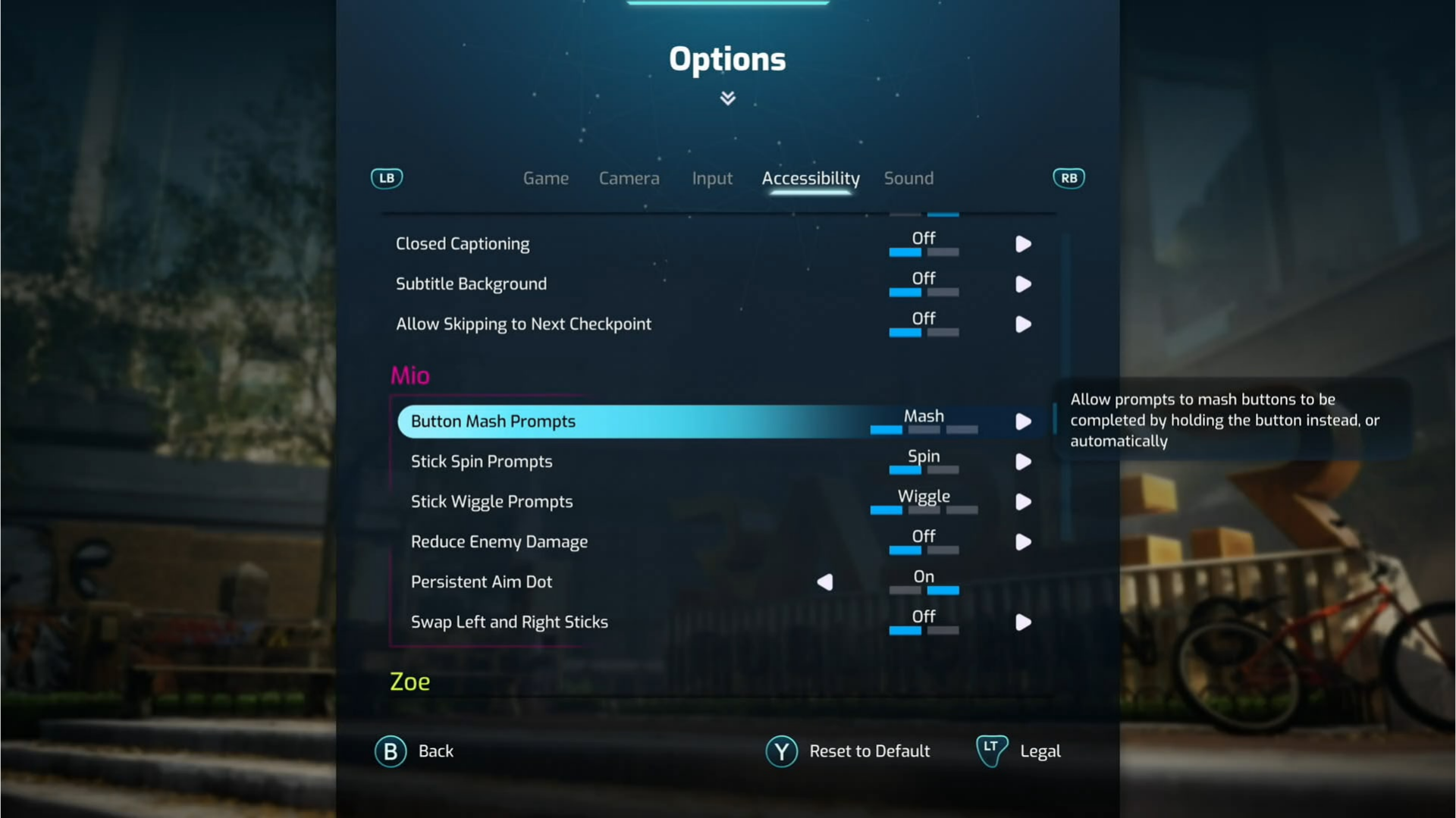
Split Fiction offers three choices for repeated-button prompts. Players can retain button mashing, replace it with holding the button, or turn the prompt off so the sequence completes automatically.
The game also provides alternatives for stick-spinning and stick-wiggling prompts. These are separate settings: stick rotation can become a held direction, while stick wiggling can become a hold or be completed automatically.
EA’s guide covers the US English version on PC and consoles. Split Fiction is available on PC, PlayStation 5, Xbox Series X|S, and Nintendo Switch 2.
Official source: https://www.ea.com/able/resources/split-fiction/split-fiction
All five options are built into their respective games and do not require mods. Check whether a setting says Hold, Automatically Succeed, Auto, or Off: these labels can represent substantially different behaviour.